
단일 Agent의 한계
단일 LLM Agent는 특정 작업에서 뛰어난 능력을 보이며 문제가 간단할수록 비용/성능/유지 보수 측면에서 효율적이지만 복잡한 문제를 해결할 대는 세 가지 근본적인 한계가 있음
- Cognitive Overload (인지적 과부하): Agent는 제한된 Context Window만을 다룰 수 있기 때문에 분석한 중요 맥락을 잊어버리거나, 정보 간 일관성을 잃고 모순된 결론을 내릴 수 있음
- Limited Specialization (제한된 전문성): Fine-tuning으로 Domain adaptation을 할 수 있지만 특정 작업에 최적화된 프롬프트와 설정을 가진 Agent는 다른 종류의 작업에 최적화될 수 없음
- Single Point of Failure (단일 실패 지점): 전체 작업의 성공 여부가 단 하나의 Agent에 달려있음
Multi Agent Systems (MAS)
Multi Agent는 자율적인 agent가 협력하여 공동의 목표를 달성하는 시스템
- Decentralized Control: 각 agent가 자체 규칙에 따라 의사 결정을 내림
- Local Views: 각 agent는 전체 시스템이 아닌 자신의 즉각적인 환경만 인식하고 반응
- Emergent Behavior: 단순 개별 상호작용이 모여 복잡하고 지능적인 행동을 만들어냄
MAS 에서의 ADK
- LLM Agent: 대규모 언어 모델을 활용하여 입력을 이해하고 추론
- Workflow Agents: 직접 작업을 수행하지 않고 다른 agent들의 작업 흐름을 조율
- Custom Agents: 특정 로직이 필요할 때 코드로 직접 작성하는 agent
핵심 개념: Agent Hierarchy
parent & sub-agents 구조로 구성
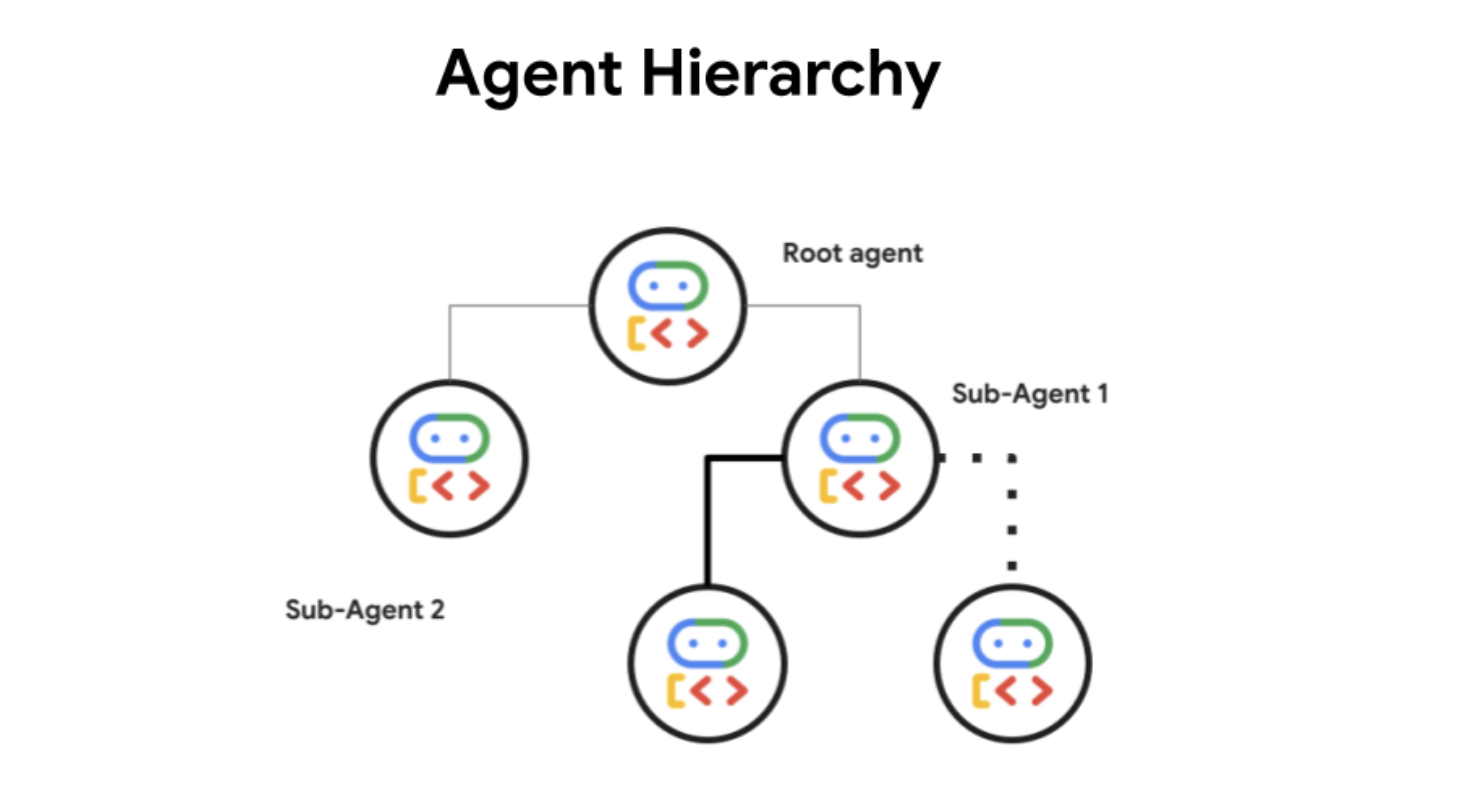
- 각 agent는 하나의 부모만 가짐 (명확한 지휘 체계)
- 루트 agent가 전체를 감독하고 하위 agent에게 작업을 위임하는 방식
Orchestrating Tasks with Workflow Agents
ADK는 복잡한 코드를 직접 짜지 않고도 작업 흐름을 제어할 수 있도록 미리 만들어진 세 가지 유형의 Orchestrator 제공
Sequential Agents
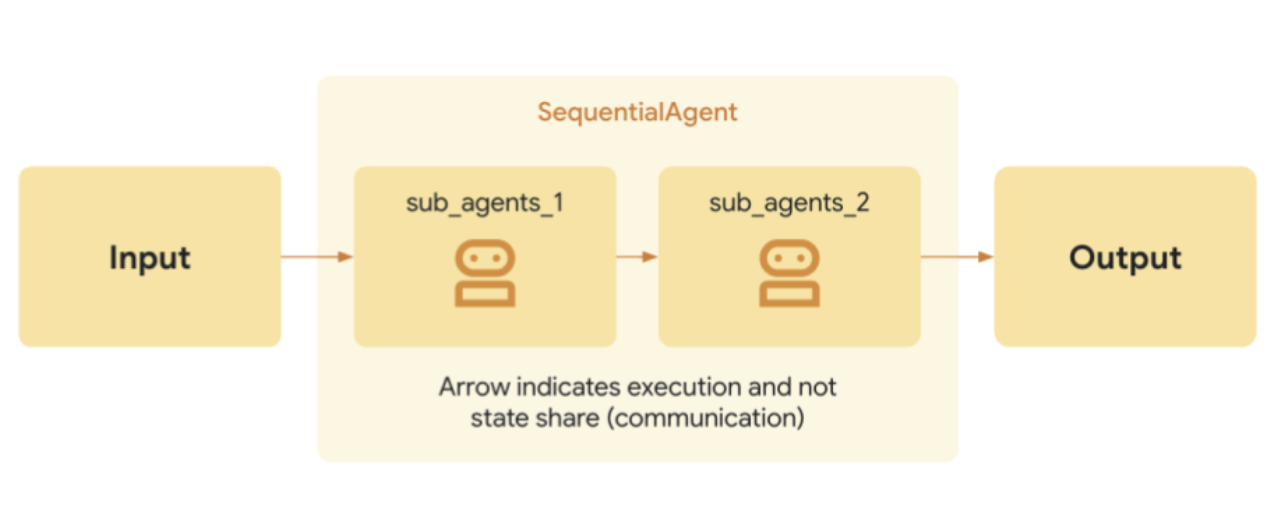
- 하위 Agent들을 미리 정해진 순서대로 하나씩 실행
- 앞 단계의 agent 결과물(output)이 다음 단계 agent의 입력물(input)로 전달
- e.g. 데이터 가져오기 -> 데이터 정제하기 -> 데이터 분석하기 -> 결과 요약하기
from google.adk.agents import SequentialAgent, LlmAgent

step1 = LlmAgent(name="Step1_Fetch", output_key="data") # Saves output to state['data']
step2 = LlmAgent(name="Step2_Process", instruction="Process data from {data}.")

pipeline = SequentialAgent(name="MyPipeline", sub_agents=[step1, step2])
# When pipeline runs, Step2 can access the state['data'] set by Step1.
ParallelAgent
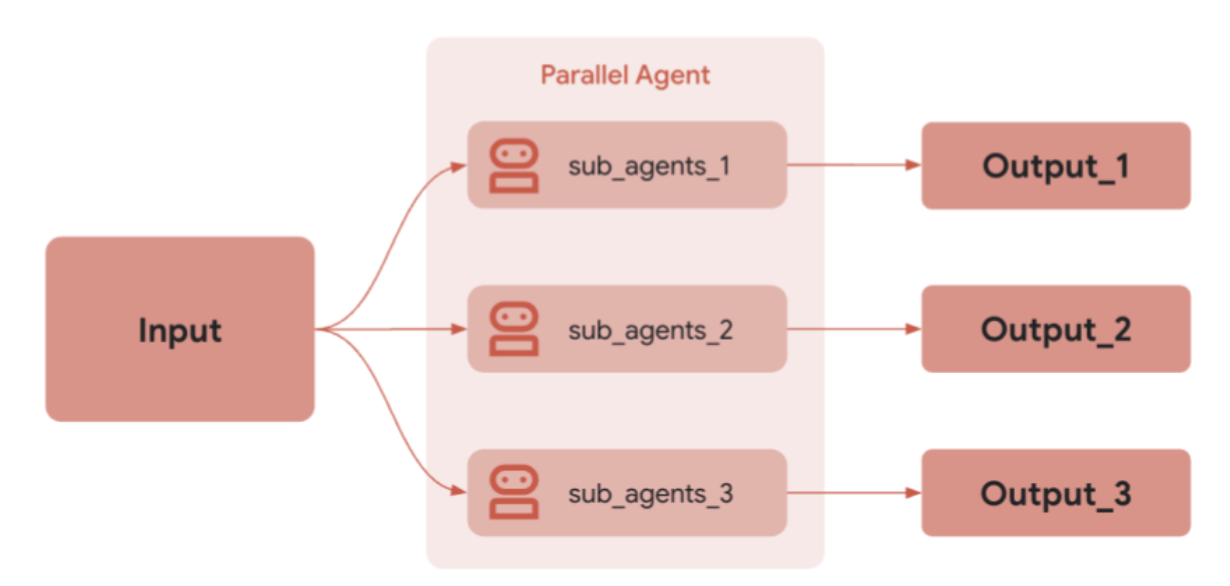
- 모든 하위 agent들을 동시에(concurrently) 실행
- 각 agent가 서로의 결과를 기다릴 필요 없이 독립적으로 일할 때 유용 (모든 결과가 나올 때까지 기다렸다가 결과를 합침)
- e.g 서로 다른 소스에서 정보를 취합할 때
from google.adk.agents import ParallelAgent, LlmAgent

fetch_weather = LlmAgent(name="WeatherFetcher", output_key="weather")
fetch_news = LlmAgent(name="NewsFetcher", output_key="news")

gatherer = ParallelAgent(name="InfoGatherer", sub_agents=[fetch_weather, fetch_news])
# When gatherer runs, WeatherFetcher and NewsFetcher run concurrently.
# A subsequent agent could read state['weather'] and state['news'].
LoopAgent
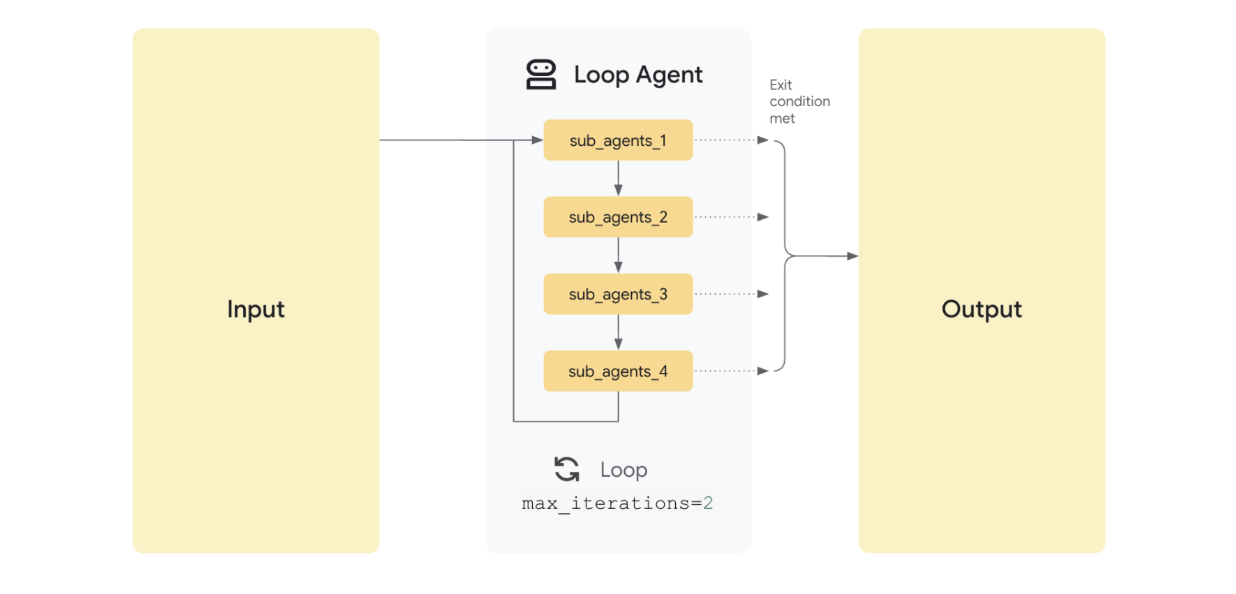
- 프로그래밍의
while루프와 같은 방식 - 특정 조건이 충족되거나 최대 반복 횟수에 도달할 때까지 하위 agent를 계속해서 반복 실행
- e.g. 완료될 때까지 확인이 필요하거나 재시도가 필요한 작업 (서버 상태가 정상이 될 때까지 API 를 주기적으로 Polling할 때, 작업이 실패했을 때 성공할 때까지 Retry 할 때)
from google.adk.agents import LoopAgent, LlmAgent, BaseAgent
from google.adk.events import Event, EventActions
from google.adk.agents.invocation_context import InvocationContext
from typing import AsyncGenerator

class CheckCondition(BaseAgent): # Custom agent to check state
    async def _run_async_impl(self, ctx: InvocationContext) -> AsyncGenerator[Event, None]:
        status = ctx.session.state.get("status", "pending")
        is_done = (status == "completed")
        yield Event(author=self.name, actions=EventActions(escalate=is_done)) # Escalate if done

process_step = LlmAgent(name="ProcessingStep") # Agent that might update state['status']

poller = LoopAgent(
    name="StatusPoller",
    max_iterations=10,
    sub_agents=[process_step, CheckCondition(name="Checker")]
)
# When poller runs, it executes process_step then Checker repeatedly
# until Checker escalates (state['status'] == 'completed') or 10 iterations pass.
Agent 통신 방법
Shared session state
- 모두가 볼 수 있는 shared digital whiteboard
- 하나의 agent가 작업 결과를 공통의 state객체에 기록하면, 계층 구조 내 다른 agent들이 이 정보를 읽어서 자신의 작업에 활용
-
e.g.
LLM Agent가 사용자의 질문을 분석하여 핵심 키워드 추출하고 state에 저장 -> 이후Custom Agent가 이 state를 읽어서 DB를 조회하는 데 사용from google.adk.agents import LlmAgent, SequentialAgent agent_A = LlmAgent(name="AgentA", instruction="Find the capital of France.", output_key="capital_city") agent_B = LlmAgent(name="AgentB", instruction="Tell me about the city stored in {capital_city}.") pipeline = SequentialAgent(name="CityInfo", sub_agents=[agent_A, agent_B]) # AgentA runs, saves "Paris" to state['capital_city']. # AgentB runs, its instruction processor reads state['capital_city'] to get "Paris".
장점
- 모든 Agent가 Single Source of Truth를 참조하므로 데이터 정합성 유지
- 새로운 Agent를 추가할 때, 다른 모든 Agent와 개별적으로 연결할 필요 없이 블랙보드의 주소만 알려주면 됨
단점
- 모든 Agent의 접근이 중앙 저장소에 집중되므로, 시스템 전체 성능 저하 병목 원인
- 여러 Agent가 동시에 같은 정보를 수정하려할 때 Race Condition 발생 가능. 이를 막기 위한 Locking 매커니즘이 추가적인 복잡성을 야기
- 단일 실패 지점(SPOF): 중앙 블랙보드 시스템 장애가 전체 Multi-Agent 시스템의 중단으로 이어짐
LLM-Driven Delegation
- 들어오는 요청을 분석하여 가장 적합한 담당자에게 일을 넘기는 coordinator
- 부모 agent가 요청 내용을 추론하여, 자신의 하위 agent 중 누가 일을 처리하기에 가장 적합한지 판단하고 작업을 라우팅
-
e.g. “여행 예약해줘” ->
Coordinator Agent가 이해 ->Booking Agent에게 구체적으로 작업 지시from google.adk.agents import LlmAgent booking_agent = LlmAgent(name="Booker", description="Handles flight and hotel bookings.") info_agent = LlmAgent(name="Info", description="Provides general information and answers questions.") coordinator = LlmAgent( name="Coordinator", model="gemini-2.0-flash", instruction="You are an assistant. Delegate booking tasks to Booker and info requests to Info.", description="Main coordinator.", # AutoFlow is typically used implicitly here sub_agents=[booking_agent, info_agent] ) # If coordinator receives "Book a flight", its LLM should generate: # FunctionCall(name='transfer_to_agent', args={'agent_name': 'Booker'}) # ADK framework then routes execution to booking_agent.
Explicit Invocation - Agent Tool
- 필요할 때만 부르는 외부 컨설턴트나 함수 호출
- Agent를 Tool 형태로 감싸서, 다른 Agent가 마치 함수를 실행하듯 직접 호출하는 방식
-
e.g. Articst Agent가 작업 도중 이미지 생성이 필요할 때마다 ImageGenerator Agent 도구를 호출하여 값을 얻음
  from google.adk.agents import LlmAgent, BaseAgent
  from google.adk.tools import agent_tool
  from pydantic import BaseModel

  class ImageGeneratorAgent(BaseAgent): # Example custom agent
      name: str = "ImageGen"
      description: str = "Generates an image based on a prompt."
      # ... internal logic ...
      async def _run_async_impl(self, ctx): # Simplified run logic
          prompt = ctx.session.state.get("image_prompt", "default prompt")
          # ... generate image bytes ...
          image_bytes = b"..."
          yield Event(author=self.name, content=types.Content(parts=[types.Part.from_bytes(image_bytes, "image/png")]))

  image_agent = ImageGeneratorAgent()
  image_tool = agent_tool.AgentTool(agent=image_agent) # Wrap the agent

  # Parent agent uses the AgentTool
  artist_agent = LlmAgent(
      name="Artist",
      model="gemini-2.0-flash",
      instruction="Create a prompt and use the ImageGen tool to generate the image.",
      tools=[image_tool] # Include the AgentTool
  )
  # Artist LLM generates a prompt, then calls:
  # FunctionCall(name='ImageGen', args={'image_prompt': 'a cat wearing a hat'})
  # Framework calls image_tool.run_async(...), which runs ImageGeneratorAgent.
  # The resulting image Part is returned to the Artist agent as the tool result.
Sub Agent vs AgentTool
- Sub-Agent: 비유를 하면 조직도의 정규직 직원. 계측 구조의 일부로서 부모 Agent에 의해 지속적으로 관리
- AgentTool: 핵심 팀 구조(계층)에는 속하지 않지만, 특정 전문 지식이 필요할 때 일시적으로 호출되어 도움을 줌
| 구분 | Sub-Agent | Tool/AgentTool |
|---|---|---|
| 관계 | 팀원(Partner) | 장비(Utility) |
| 실행 주체 | workflow (순서나 라우팅 규칙에 따라 실행) | LLM (대화 도중 필요하다고 판단되면 호출) |
| 상태 공유 | 부모와 state를 공유하며 문맥을 이어감 | Input을 주고 Output만 받음 |
| 복잡도 | 복잡한 사고나 다단계 작업 수행 | 단일 기능이나 명확한 작업 수행 |
Regerence
[1] https://cloud.google.com/blog/topics/developers-practitioners/building-collaborative-ai-a-developers-guide-to-multi-agent-systems-with-adk?hl=en
[2] https://google.github.io/adk-docs/agents/multi-agents/
PREVIOUSGoogle ADK 기본 개념
NEXTAgents 평가 방법